The AI Model Stack for Instructional Design
Which AI models to use for which tasks, how & why

Hey folks! 👋
On my bootcamp, Instructional Designers ask me some version of this question every cohort:
“What’s the best AI model for instructional design?”
I understand where this is coming from. The AI tool landscape is moving so fast that it feels like if you just pick the right model, the work will get easier.
But here’s the truth: there’s no single AI tool that “does instructional design best.” There is, however, an optimal AI stack for Instructional Design work.
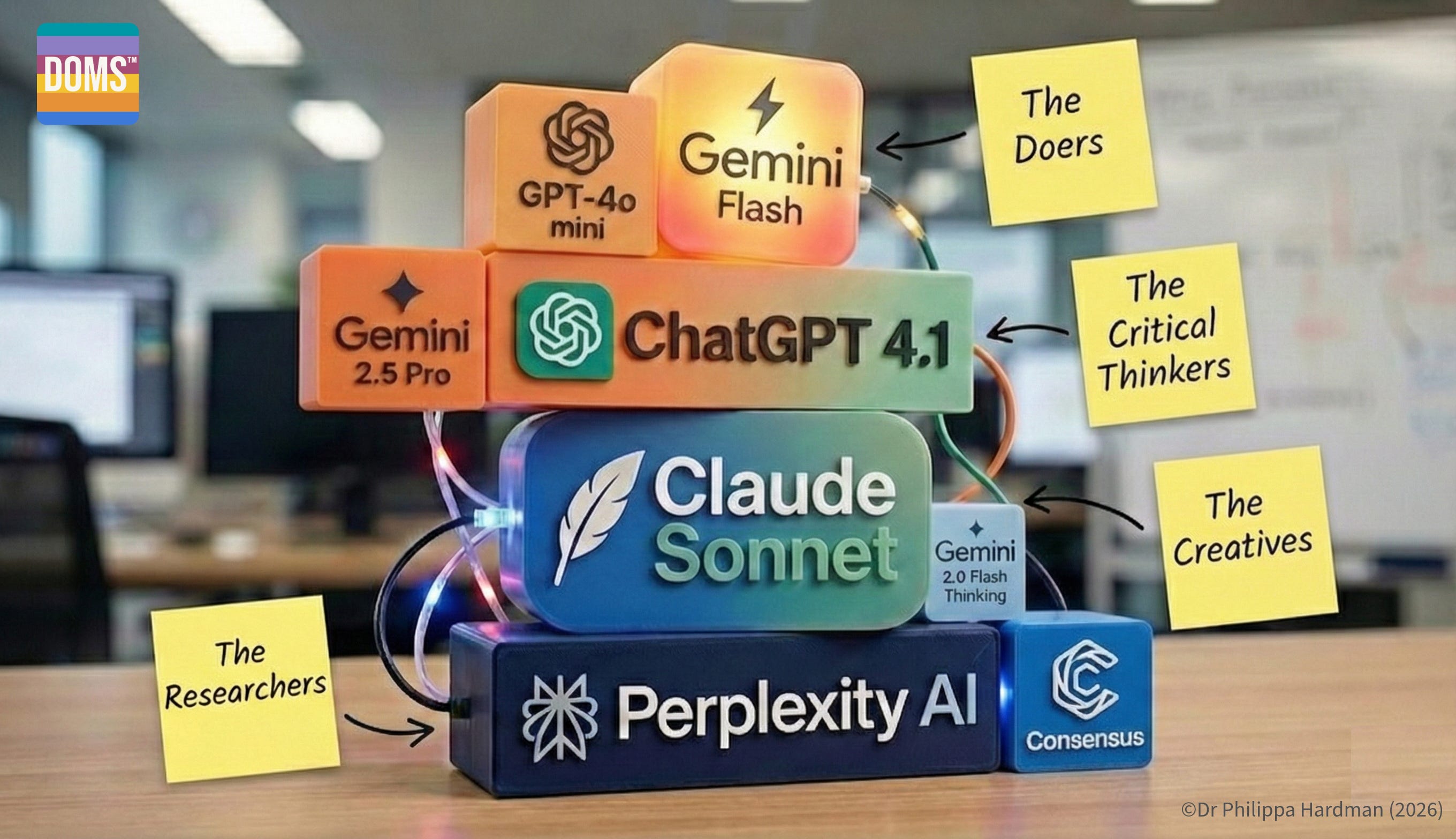
The TLDR is that rather than trying to force one model to do everything, AI works best as a copilot for Instructional Design when you switch models as the job changes.
So instead of asking: “Which AI model is best for my workflow?”, ask instead: “Which A model is best for this specific task?”.
In this week’s post, I share my take on what the optimal AI stack look like, mapped the the Instructional Design workflow.
Let’s go!
The Researchers
When you complete any Instructional Design task, the first question we should ask ourselves is: how do I do this task as well as possible?
For example, I can rustle up some learning objectives in five minutes, but what would it mean to write learning objectives like a specialist objectives-writer, in a way that optimises for learner engagement and impact?
Perhaps the most under-rated AI use case in Instructional Design is research. AI is an incredibly powerful tool for generating and summarising up to date information on how to complete specific Instructional Design tasks well.
At this point, AI’s job is not to be creative. It’s to:
look up best practices, proven methodologies and frameworks for specific tasks;
extract reusable how-to guidance you can use later (and paste into prompts).
Optimal AI Models
The most effective AI architecture for this use case is Retrieval Augmented Generation (RAG).
RAG is an AI framework that enhances the accuracy and relevance of Large Language Models (LLMs) by fetching up-to-date data from external, trusted sources before generating a response
Whereas a Large Language Model like ChatGPT answers primarily from what it learned during training, RAG systems are effectively like research assistants that go and look things up from an agreed set of sources before they answer you.
Best tools in the category:
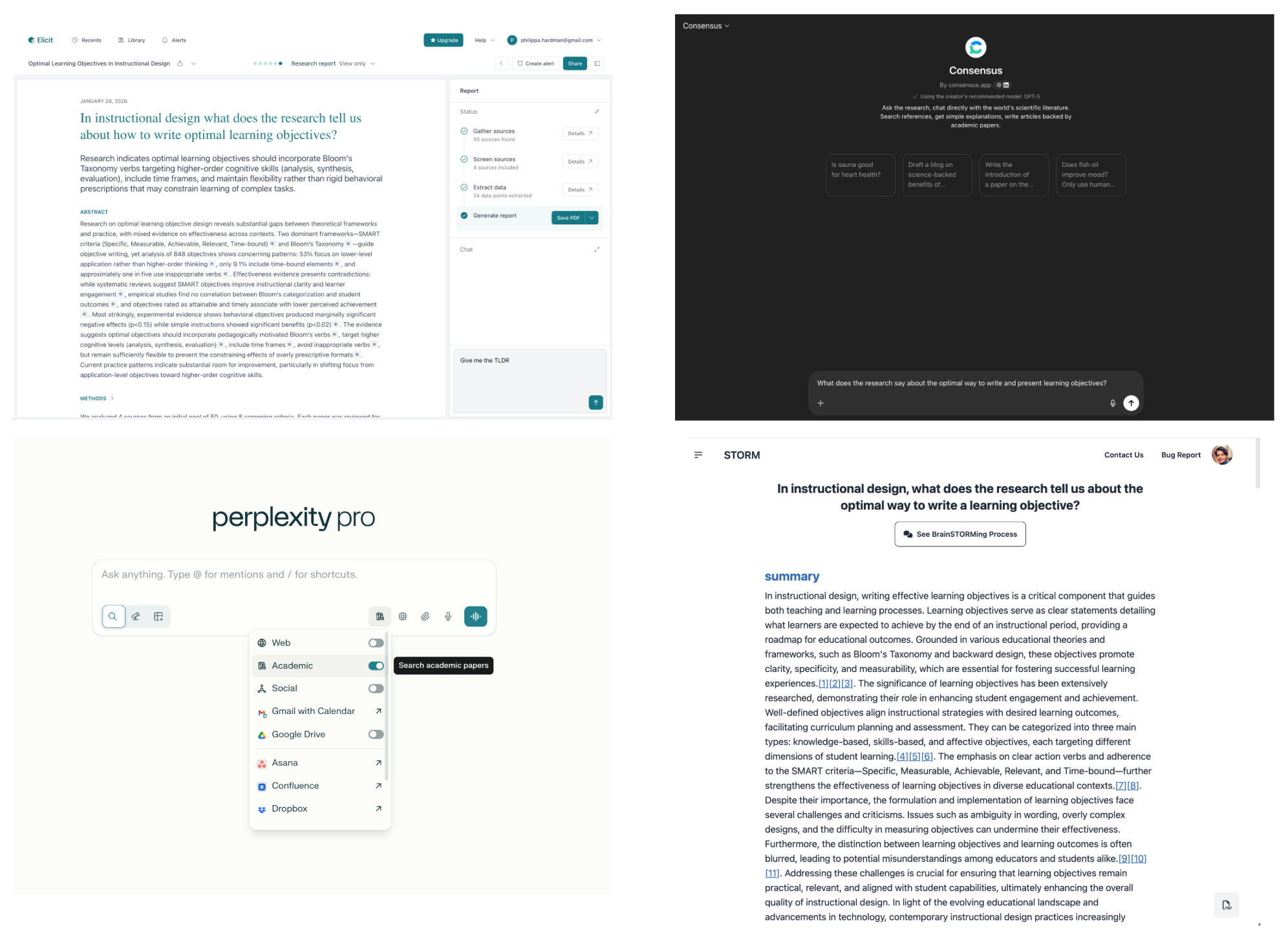
Perplexity: searched and summarises research. Use academic mode to limit its sources to robust, peer reviewed research.
Consensus: summarises research from simple prompt questions. I like to use ConsensusGPT in ChatGPT, but there’s also a dedicated app.
Elicit: generates research summaries from simple prompt questions which you can “chat with” or download. I like to use ElicitGPT in ChatGPT, but there’s also a dedicated app.
STORM: generate a research summary which you can then turn into summaries etc using an LLM.
These tools are designed specifically to surface reliable, peer reviewed and industry reports. When you use these tools, you’re not “just chatting to an LLM”. You are triggering a mini research workflow: search → select sources → synthesise and cite. )
Impact & Pro Tips
These models don’t just generate information — they generate rich inputs and guidelines that can turn AI from a very generic, junior Instructional Designer into a more expert Instructional Design copilot.
Use these tools to create:
Evidence-based design principles to use when completing a task.
Examples of great and not great to show AI what to produce.
Examples of common misconceptions for AI to avoid.
Step by step ‘how-to’ guides to define how AI executes a task.
Example prompt
“In Instructional Design, what does the research tell us is the optimal instructional strategy to improve sales professionals’ influencing skills in order to drive sales?
Using only the research you surface, give me:
- A full research summary, with citations and a TLDR version
- A practical, step by step guide, to help anyone apply the best practices surfaced in the research
- A list of common misconceptions to avoid
- 3 examples of great and 3 examples of poor.”
The Creatives
Once you’ve defined how a task should be done, the next question you might ask as an Instructional Designer is: What are the plausible ways this could work in the real world?
For example, if I’ve defined with a research tool that the best method for assessing a specific objective is a scenario-based knowledge check, how might I get creative with this and define some original, engaging activities within these constraints?
In this context, AI’s job isn’t to decide what the learning design should be — it’s to help you to generate a high-quality option set: scenarios, metaphors, formats, narratives, examples, and alternative approaches — all anchored to the evidence and “how-to” rules you extracted with research tools.
At this point, AI’s tasks might include:
generate lots of plausible options quickly;
explore variety (contexts, stakes, power dynamics, emotional temperature);
help you see different angles on the same learning goal;
surface learner struggle points you can design around.
Optimal AI Models
The best models here are ones that behave most like creative collaborators: they tolerate ambiguity, produce variation before converging and maintain narrative coherence.
Best tools in the category:
Claude Sonnet 4.5 consistently outperforms other model for creative ideation and is noted be strong at creative storytelling, character depth, and scenario writing. It generates broad variation before converging, and stays coherent across longer narratives.
Gemini 3 Flash Thinking is exceptional for character depth, philosophical dialogue, and creative storytelling. Strong at emotional nuance and internal motivation, with strong multimodal capabilities.
DeepSeek R1 is - perhaps surprisingly - known for its creative thinking. Free-spirited, uninhibited, and personality-driven, this model is great when you want voice, tone, and distinctiveness rather than corporate polish.
Impact & Pro Tips
Creative models don’t automatically produce learning-relevant ideas. They produce ideas. Your job is to keep those ideas constrained by the evidence and “how-to” rules.
Use creative models to generate:
Scenario families that vary context but follow the same underlying skill steps.
Alternative modalities (scenario vs worked example vs simulation vs coaching toolkit).
Metaphors and analogies aligned to your learner world.
Learner struggle maps: where will this go wrong in practice?
The most important pro tip here is: Don’t prompt creativity from scratch. Instead, prompt creativity from a research summary and checklist generated with a research tool.
Example prompt
“Using the evidence-based principles and the step-by-step ‘how-to’ checklist (attached), generate 8 scenario concepts for practising difficult conversations.
Always follow the principles and step by step provided, but vary the context, emotional intensity, and power dynamics. Highlight where learners are most likely to struggle.”
The Critical Thinkers
Once you’ve explored options, the next big question is: which choices should we commit to — given our constraints — and why?
This is the phase where AI outputs often sound persuasive but quietly miss the learning logic. Ai’s job here is not “generate more content.” It’s to support judgment:
Which outcomes are most important in my context?
Which scenario best supports transfer for my business goal?
Which analogy is most likely to resonate with my learners?
What are the risks of benefits of X versus Y, given my goals?
At this point, AI’s job is to:
compare options against constraints (time, audience, modality, risk);
reason through trade-offs;
pressure-test alignment: outcome ↔ activity ↔ assessment;
articulate decisions in a way you can defend to stakeholders.
This is also where most analysis work in instructional design should live. At this stage, “analysis” isn’t about gathering more information — it’s about making sense of data you already have.
Optimal AI Models
The most effective tools here are models that behave like careful reasoning partners: they hold context, plan across steps, and produce transparent justification.
Best tools in the category:
ChatGPT o series is great at step-by-step reasoning which makes it excellent for structured exploration and decision explanation.
Claude Opus is known to be a careful, detail-attentive model with low shortcutting. This makes it a strong candidate to supper for complex decision-making.
Gemini 3 Pro is built to deliver enhanced reasoning and planning. It has strong long-context synthesis and is effective as exploring abstract concept relationships. Its advanced multimodal understanding (text, images, audio, video) can also be helpful when making decisions.
Also worth noting: many reasoning models now include extended thinking modes (e.g., Claude Opus 4.5 with extended thinking enabled). These are particularly useful when you need transparent step-by-step justification.
Impact & Pro Tips
This is where AI becomes a legitimate copilot — but only if you force it to be explicit.
Use reasoning models to produce:
Measurable learning outcomes aligned to the “how-to” steps
A clear practice flow (model → attempt → feedback → retry)
An assessment logic that matches the outcomes
A list of trade-offs you’re making (and why they’re worth it)
A quick alignment check that flags gaps early
Example prompt
“From the scenario concepts above, select the best 4 for a 60-minute module.
Define 3 measurable learning outcomes aligned to the checklist. Propose a practice flow and explain the trade-offs you made.”
The Doers
Once decisions are locked, the question shifts to: how do we turn execute? At this point, AI’s job is not to help you to decide or to give feedback and suggestions. Its job is to:
apply the rules you’ve already defined (templates, tone, constraints) with high fidelity;
scale assets across modules, audiences, and formats without drifting from the spec;
rewrite and adapt content while preserving intent, difficulty, and alignment;
run lightweight QA passes against your outcomes, checklist, and constraints.
Optimal AI Models
The most useful models here behave like dependable production assistants: they follow instructions, respect structure, and avoid “getting clever” unless you explicitly ask.
Best models in the category:
GPT 4.1 mini [legacy] — strong instruction-following, excellent at filling and reusing templates, and reliable for structured outputs like tables, JSON, and checklists.
Gemini 3 Flash — frontier-level performance with a strong focus on speed and cost, ideal when you need to generate or adapt large volumes of content quickly.
Gemini 3 Flash Lite — designed for fast, lightweight generation and summarising, with long context and upgraded reasoning while still optimised for scale and latency.
Impact & Pro Tips
Execution models don’t just help you work faster — they help you lock in patterns so your entire curriculum feels coherent, even when assets multiply.
Use them to create:
templated lesson scripts, storyboards, and facilitator guides that all follow the same structural rules;
banks of scenarios that share an underlying skill model but differ by audience, context, or stakes;
consistent rewrites for different segments (frontline vs leadership) while preserving outcomes and difficulty;
rubrics, checklists, and QA views that map each asset back to outcomes, practice steps, and constraints.
Pro tips:
Always paste the research summary, design checklist, and decision log into your execution prompt — treat them as “non-negotiable rules,” not background colour.
Bake QA into the prompt: ask the model to produce the asset and a mini QA report (e.g. mapped to outcomes and checklist) in one go, so every draft ships with its own alignment check.
Example prompt
“Read the success rubric attached. Then, use it to QA the course design attached. You must work line by line and score the design against each item in the rubric. Always include a rationale for your score, using the criteria in the rubric.
When the score is less then 5/5, describe how to achieve 5/5. Give me the output as a table.”
Yes — and this is actually a perfect place to close the loop.
Here’s a conclusion that explicitly ties the tool stack back to FRAME, without re-explaining FRAME from scratch, and without breaking the flow of the post. It assumes the reader has seen FRAME before (or will recognise it), and shows how this stack operationalises it.
Closing Thoughts
If there’s one idea I want you to take away from this post, it’s this: AI doesn’t replace instructional design expertise — it amplifies it.
The biggest gains I see on the ground don’t come from people finding “the best” AI model or tool. They come from people learning to sequence their thinking and match the AI tool to the cognitive job at hand. In practice, this looks like:
using research models to define the “how”;
using creative models to generate ideas (diverge);
using reasoning models to make decisions (converge);
using execution models to implement decisions.
When you use AI like this, AI stops behaving like a generic, overeager junior designer — and starts behaving like a specialist copilot at each stage of the workflow.
The real key AI skill for Instructional Designers in 2026 it’s choosing the right AI architecture to support specific Instructional Design tasks.
If you remember one thing, remember this:
Don’t ask “What’s the best AI model?” Ask “What is the job right now — and which AI is built for that job?”
That shift alone will dramatically change the quality, defensibility and impact of the learning you design with AI.
Happy experimenting,
Phil 👋
PS: Want to learn how to apply AI at each step of your process with me and a community of people like you? Apply for a place on my bootcamp!