Hey folks 👋
When L&D teams first started using AI regularly, the question I got asked most was: “How can I use AI to make more courses and more content, more quickly?” In 2026, content creation is still the number one use of AI in L&D (Taylor and Vinauskaitė, 2026), but the questions L&D teams are asking are starting to change.
This year, in my day-to-day work and on my bootcamp, one question has come up more than any other: “How do I use AI to make the learning experience more dynamic, active and experiential?” Our focus is shifting from using AI to produce content to using AI to innovate the learner’s experience.
This seems to be part of a broader trend. Over a third of L&D professionals now say improving the quality of learning experience is one of the main things they want from AI. However, ambition hasn’t yet turned into action: only one in six of us (16.6%) use AI in ways that learners interact with directly, such as AI-based practice, feedback or coaching (Taylor and Vinauskaitė, 2026). For most of us, AI is still a “back end” tool for streamlining the L&D workflow, rather than a way to improve what our learners experience.
So I’ve been exploring a question: if so many of us want to use AI to innovate the learning experience, why aren’t we doing it? Three barriers keep coming up in my interviews with L&D folks:
We don’t know what to ask AI for. We ask AI for learning experiences which are “innovative” and “dynamic”, but we just get content and a quiz with a shinier interface. That’s because AI fills any gap in a request with the most common example of what we asked for, and the most common example of digital learning is content followed by a quiz.
When we do build something new, we don’t know how to check it. What AI builds often looks impressive, but is every rule correct? Does it teach what we intended? Could a learner succeed without learning anything at all? Most of us don’t have a reliable way to answer these questions without spending hours on QA, so we don’t bother.
We don’t know how to get it into our LMS. An interactive built in a tool like Claude or ChatGPT is usually a single web page, not a SCORM package. We’re often left wondering how to upload it, track completion and see what learners actually did. Without answers to these questions, even promising prototypes rarely make it beyond a demo.
This week, I’m sharing a practical way to tackle all three barriers: game design. It’s an approach I’ve been testing to help turn the ambition for better learning into something we can actually build, which actually enhances learning.
In this post, I’ll show you how the approach works in practice: where game design and learning design overlap, how to match a game to a learning objective, the prompts I used to build five pro learning games with AI, and the checks I’d run before anything goes near a learner.
Let’s dive in. 🚀
Where Game Design Meets Learning Design
Game designers have long seen games as, essentially, learning experiences. For decades, researchers like Gee, Koster, Malone & Csikszentmihalyi have explored how games get people to take on difficult challenges, develop new skills and want to keep going.
For us learning designers, the value of game design is huge. The motivation, curiosity, persistence and absorbed focus we see in gaming are exactly the behaviours and conditions we want to see (but rarely achieve) in learning experiences. By analysing the mechanisms of game design we can start to understand what sorts of design approaches make people stay with a challenge long enough to try a strategy, see what happens, use the feedback and try again.
Of course, motivation, persistence and flow don’t, by themselves, lead to sunstantive learning. But they help explain why game design is worth our attention: it offers ways to sustain the effort that meaningful practice requires. Our job is to make sure that effort develops the capability we actually want.
Perhaps the most influential account of the overlap between game design and learning design comes from James Paul Gee’s 2003 book, What Video Games Have to Teach Us About Learning and Literacy.
His central insight is useful for us as learning designers: good games get people to tackle difficult problems, practise persistently and develop increasingly sophisticated knowledge, skills and behaviour.
In this groundbreaking work, Gee set out 13 design principles which apply both to great games and to great learning experiences (you can check them out in this video 👇).
Gee was also clear about what stood in the way of applying powerful game design principles to learning design: “the cost of implementing them” (Gee, 2005). Back in 2005, building a well-designed game took a development team, time and a budget that most L&D teams simply didn’t have.
AI has dramatically lowered this implementation barrier. With a clear design brief, a single learning designer can now use coding-capable models like Claude Opus 5.5, GPT‑6 Astra and Gemini 4 Argon to build a playable game in minutes.
What’s left for us is the part that always mattered most: choosing the right game for the objective in question, and checking that that what we created has the impact on learning that we intended.
Translating Game Design into Learning Design
While there’s a lot of overlap between game design and learning design, saying they’re the same thing is an oversimplification. Creating conditions that drive motivation, persistence and flow means people keep doing something, but it doesn’t necessarily mean they learn anything.
Think of the hours many of us have spent on a puzzle game on our phones. We might get very good at the puzzle game, but not much else. That’s the catch: people get better at whatever a game makes them practise. So a learning game only works if the thing players do over and over is the thing we need them to learn, such as applying a policy, spotting a risk or making the right call.
This is where we, as learning designers, come in. Game design gives us powerful mechanisms for motivation, persistence and practice. Our job is to decide:
when a game is, and isn’t, the right answer to a learning problem
which game design approach to use, based on the objective.
The research shows why learning design expertise matters. Without it, learning games fall short:
Looking like a game isn’t enough. On average, educational games are no more motivating than conventional instruction (Wouters et al., 2013). Why? Because most “learning games” copy how games look, not how they work.
The gains come from learning design. Learning games outperform other approaches most when they’re built around principles that drive learning. Better-designed versions of the same game beat standard versions (g = 0.34), and the biggest gains came from adding scaffolding: support that guides learners at first, then fades (g = 0.41) (Clark, Tanner-Smith and Killingsworth, 2016). Other features that reliably improve learning from games include coaching (advice and feedback during play) and self-explanation (prompting players to explain their choices) (Mayer, 2019).
Designing & Building Learning Games 101
First, a warning: if you just ask AI to design and build a “learning game”, you get a quiz dressed up in game-like costume.
As ever, when it comes to designing learning games, AI needs you — specifically, the expertise to enable you to tell AI not just what to do but how to do it.
To help you get started, I created a simple 3-step guide to take you from learning objective > pro game design prompt:
Step 1: Write your objective as “Learners will be able to…”. For example: “Learners will be able to spot a personal data breach in their everyday work.”
Step 2: Define your objective’s level using the associated verb, e.g.
Explain or predict → level = Understand.
Follow a process → level = Apply.
Spot or notice → level = Analyse.
Decide or justify → level = Evaluate.
Produce or design → level = Create.
Step 3: Use the objective > game design map (below 👇), to design and build your learning game:
Explain or predict → level = Understand → The Fish Tank game design approach
Follow a process → level = Apply → Well-ordered Problems game design approach
Spot or notice → level = Analyse → Situated meaning game design approach
Decide or justify → level = Evaluate → Skills as Strategies game design approach
Produce or design → level = Create → Co-Design game design approach
Objective > Game Design Map + Prompts
Objective level = Understand: explain or predict how something works
Design a game that follows the principle of: The fish tank
What it is: Players start with a simple version of a scenario or problem. They guess what will happen when they change something, then see the result. More detail is added as they get better.
Why it works: Starting simple stops people feeling overwhelmed, so they can see how things connect (Sweller, 1988). Guessing first, then seeing the result, shows them where their thinking is wrong, so they can fix it.
The Build:
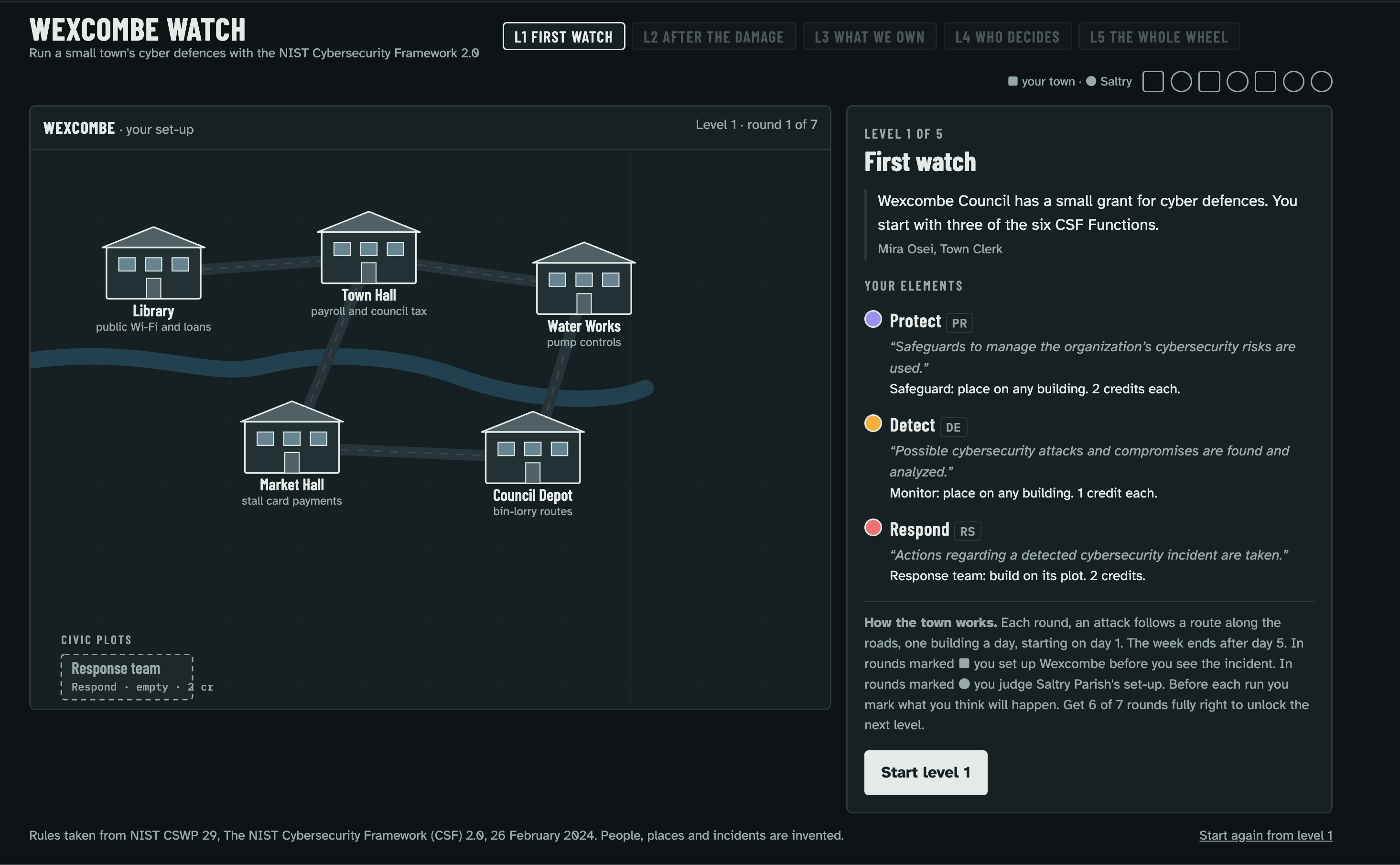
Best source document: A framework or model that explains how the parts affect each other, such as a risk model, a pricing model or a framework like the NIST Cybersecurity Framework.
What to ask AI for: “Build a learning game that follows James Paul Gee’s “fish tank” principle: a simplified version of a complex system, so the player can see clearly how one thing affects another. The aim is for the player to be able to explain and predict how [system, e.g. the NIST Cybersecurity Framework] works. Model the game on a sandbox simulation game like SimCity. Start with the simplest version of the system: just two or three of its most important elements. The player sets up the system themselves, for example by switching elements on or off or adjusting settings within a limited budget. Before each [event, e.g. incident, new case, price change], they mark on the scene what they think will happen to their own set-up. Then they run it and compare. Once their predictions are mostly right, add the next most important element. Repeat, level by level, until the player is working with the full system. Make it a game, not a quiz. The player acts on the scene, by clicking, setting, typing or building, and never chooses from a list of possible answers. No button, stamp or menu may name or hint at the answer. The game works out whether they were right from what they did, and shows what happens as a result. Check that no simple strategy, such as always saying yes or doing everything, can pass a level. Take every rule from the attached [source document] and invent only the people and scenarios.”
Objective level = Apply: carry out a procedure correctly
Design a game that follows the principle of: Well-ordered problems
What it is: Players practise the basic steps on easy cases until they can do them without thinking. Then each new level adds an exception or a twist.
Why it works: Learning the basics before the exceptions means people are never asked to do everything at once. Practice makes the basics automatic, so they can focus on the tricky cases (van Merriënboer, 1997).
The Build:
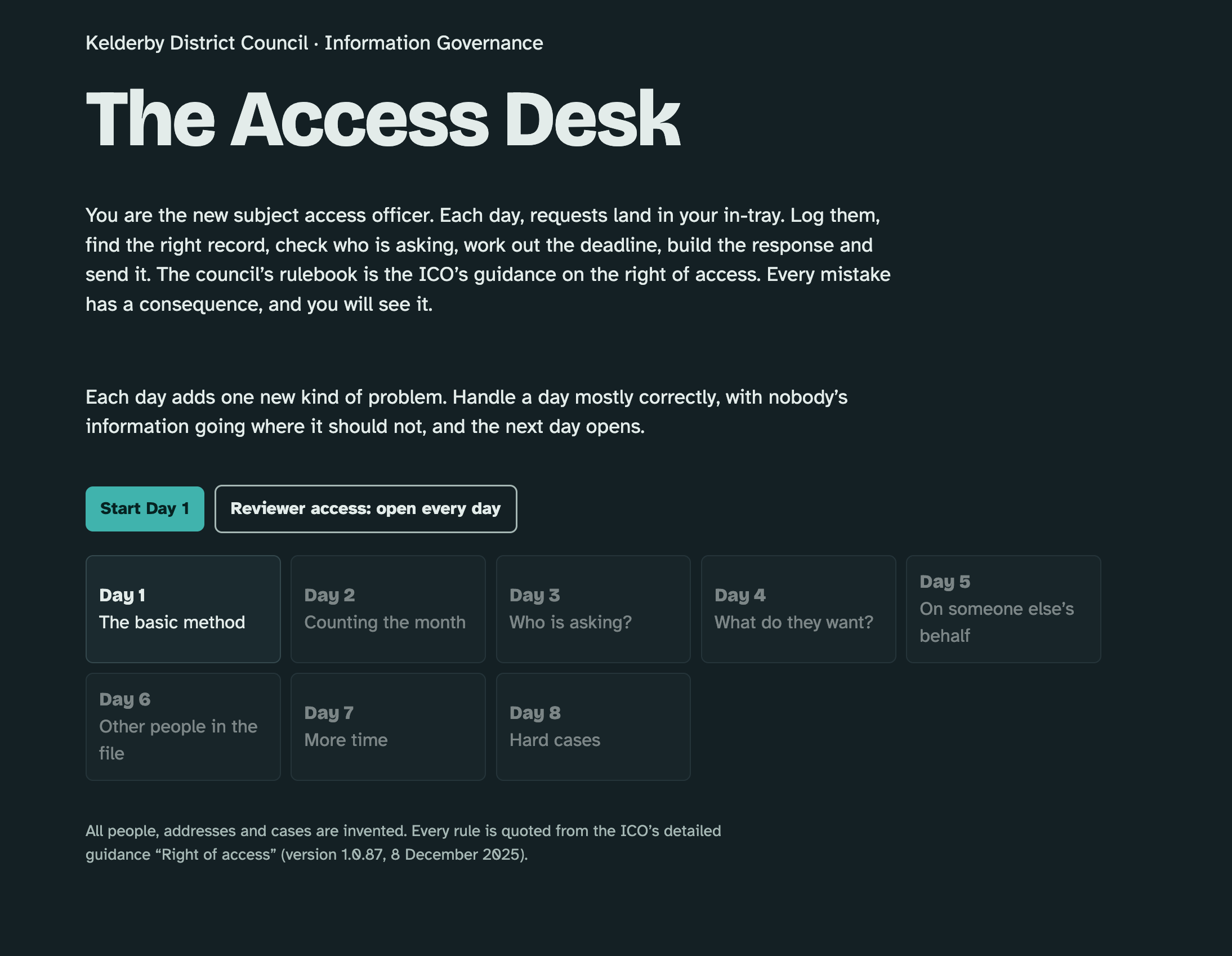
Best source document types: A procedure or SOP with clear steps, decision points and exceptions, like the guidance on the right of access from the UK Information Commissioner’s Office (ICO).
What to ask AI for: “Build a learning game that follows James Paul Gee’s “well-ordered problems” principle: early problems are designed so the player builds a sound basic method, and each later problem builds on it by adding one new challenge. The aim is for the player to be able to carry out [procedure, e.g. handling a subject access request] correctly, from start to finish. Model the game on the early days of Papers, Please, a game where the player processes a queue of cases against a set of rules. The player carries out each step themselves, for example checking documents for discrepancies, entering dates, working out deadlines and completing the response. A mistake at one step causes a problem later in the same case, as it would at work. Start with the simplest cases: ones that need only the basic steps. Once the player handles these mostly correctly, add the next most common exception or twist. Repeat, one new twist per level, until the player is handling the full procedure. Make it a game, not a quiz. The player acts on the scene, by clicking, setting, typing or building, and never chooses from a list of possible answers. No button, stamp or menu may name or hint at the answer. The game works out whether they were right from what they did, and shows what happens as a result. Check that no simple strategy, such as always saying yes or doing everything, can pass a level. Take every rule from the attached [source document] and invent only the people and scenarios.”
Objective level = Analyse: spot what matters in a situation
Design a game that follows the principle of: Situated meaning
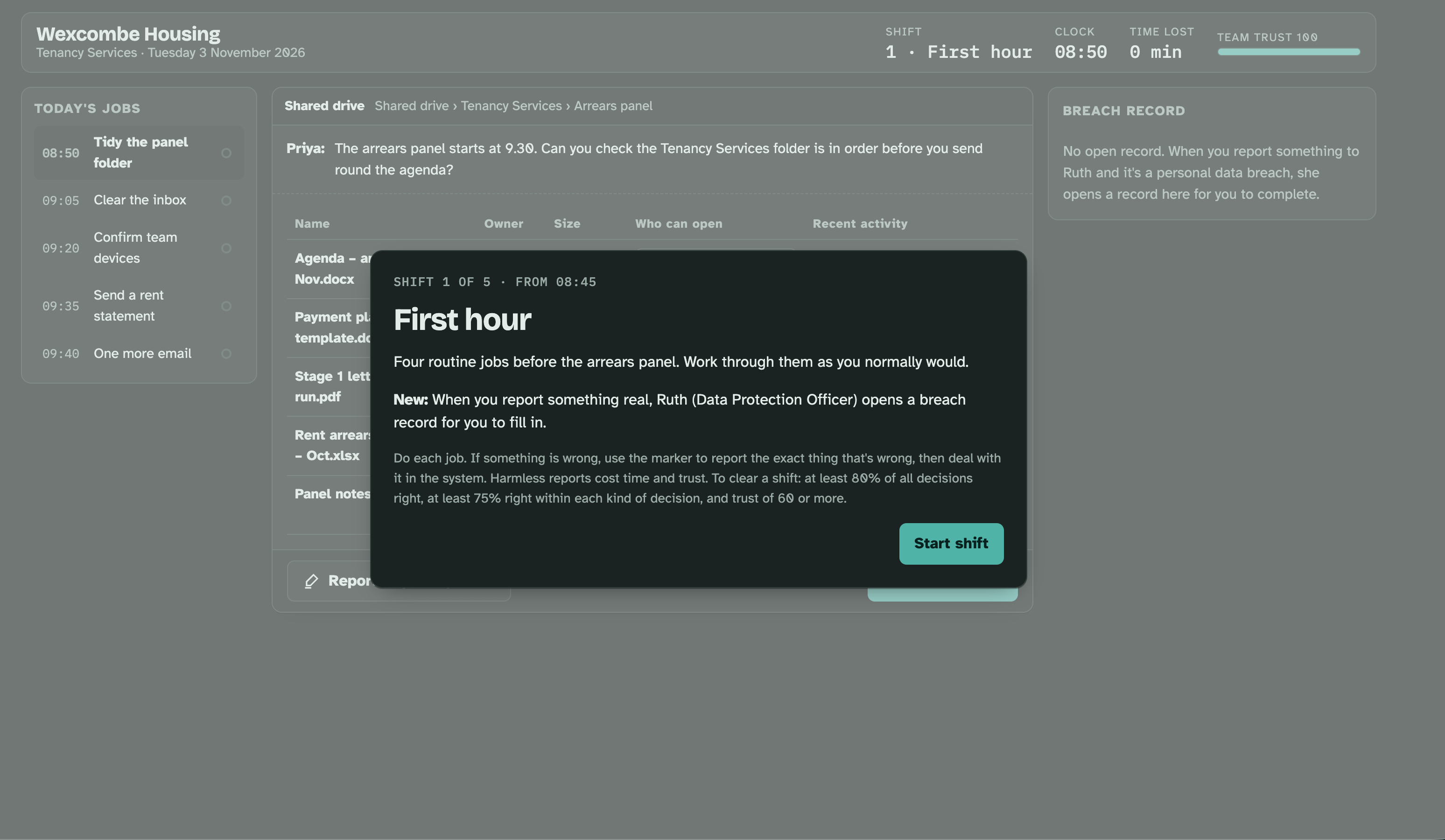
What it is: Players work through a realistic working day and have to spot warning signs mixed in with things that look similar but are harmless.
Why it works: We remember best in situations like the ones we learned in, so a realistic day prepares people for the real thing (Tulving and Thomson, 1973). Seeing warning signs next to harmless look-alikes teaches them what actually matters (Schwartz and Bransford, 1998).
The Build:
Best source document types: Guidance that lists the warning signs to look for and the things that don’t count, like the ICO’s Personal data breaches: a guide.
What to ask AI for: “Build a learning game that follows James Paul Gee’s “situated meaning” principle: rules and warning signs only make sense in the situations where they appear, so the player learns them inside realistic work, not as a list. The aim is for the player to be able to spot [warning signs, e.g. signs of a data breach] in their everyday work and respond correctly. Model the game on I’m on Observation Duty, a game where the player watches a familiar scene and must report anything that’s wrong. Set it in a realistic working day. The player finds problems themselves by clicking the exact line, field or detail that is wrong. Never ask “Is anything wrong?”. Flagging something harmless costs time or trust, so they can’t flag everything. When they find a problem, they deal with it in the scene, for example by drafting the message, logging it or escalating it to the right person. Start with the simplest version: a few routine tasks with one obvious warning sign. Once the player spots these mostly correctly, make the signs subtler and add harmless look-alikes. Repeat, level by level, until the player is working through a full, busy day. Make it a game, not a quiz. The player acts on the scene, by clicking, setting, typing or building, and never chooses from a list of possible answers. No button, stamp or menu may name or hint at the answer. The game works out whether they were right from what they did, and shows what happens as a result. Check that no simple strategy, such as always saying yes or doing everything, can pass a level. Take every rule from the attached [source document] and invent only the people and scenarios.”
Objective level = Evaluate: make and justify decisions
Design a game that follows the principle of: Skills as strategies
What it is: Players face a mix of different cases, decide which rule applies to each one, and explain every decision using evidence from the source.
Why it works: A mix of cases makes people work out which rule fits, rather than repeating the last answer (Rohrer and Taylor, 2007). Explaining each decision deepens their understanding (Chi et al., 1989).
The Build:
Best source document types: A policy or rulebook where rules combine, conflict or need interpreting, like this travel policy from University College Dublin.
What to ask AI for: ”Build a learning game that follows James Paul Gee’s “skills as strategies” principle: the player learns rules as tools for reaching a goal, not as facts to memorise, so every decision must be worked out and justified. The aim is for the player to be able to decide [decision, e.g. whether an expenses claim should be approved] and justify it from the rules. Model the game on the later days of Papers, Please, where the player faces a mixed queue of cases and must decide each one against a full rulebook. For each case, the player acts on it, for example approving, rejecting or adjusting it, and entering the exact amount or outcome. They then justify the decision by finding the line in the full rulebook themselves; never offer a shortlist of quotes. Consequences arrive later, as they would at work. Start with cases where only one rule applies. Once the player decides these mostly correctly, add cases where rules combine or conflict. Repeat, level by level, until the player is handling the full mix. Make it a game, not a quiz. The player acts on the scene, by clicking, setting, typing or building, and never chooses from a list of possible answers. No button, stamp or menu may name or hint at the answer. The game works out whether they were right from what they did, and shows what happens as a result. Check that no simple strategy, such as always saying yes or doing everything, can pass a level. Take every rule from the attached [source document] and invent only the people and scenarios.
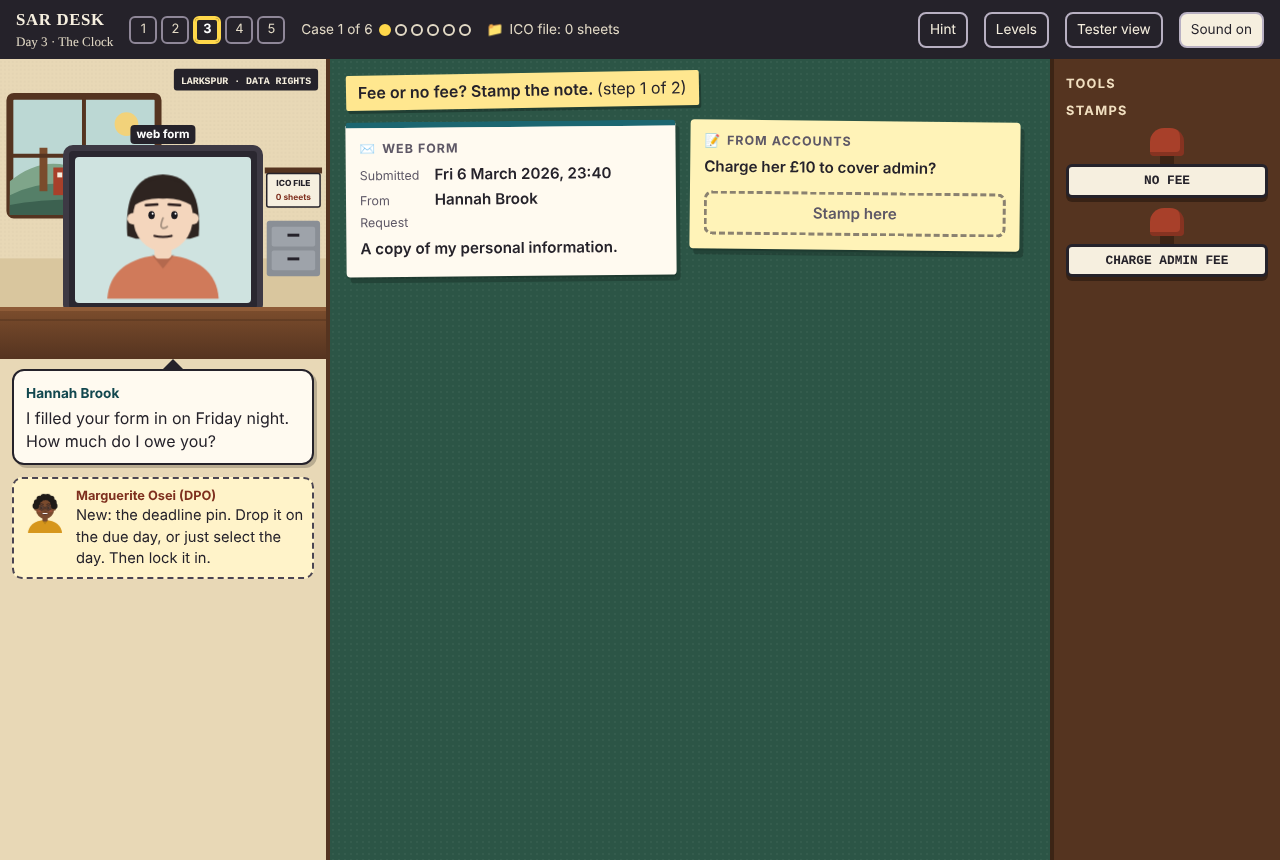
Using the prompt above, I turned University College Dublin’s travel policy into a simulated claims desk where learners decide what to pay on every line of a claim, justify it from the policy, and find out later whether their decisions held up.
👉 Play it yourself here. 👈
Objective level = Create: produce work to a standard
Design a game that follows the principle of: Co-design
What it is: Players make something, test it against the standard, and use what they learn to improve it.
Why it works: We remember what we make better than what we read (Slamecka and Graf, 1978). Testing the work shows people exactly what to fix, which is the most useful kind of feedback (Hattie and Timperley, 2007).
The Build:
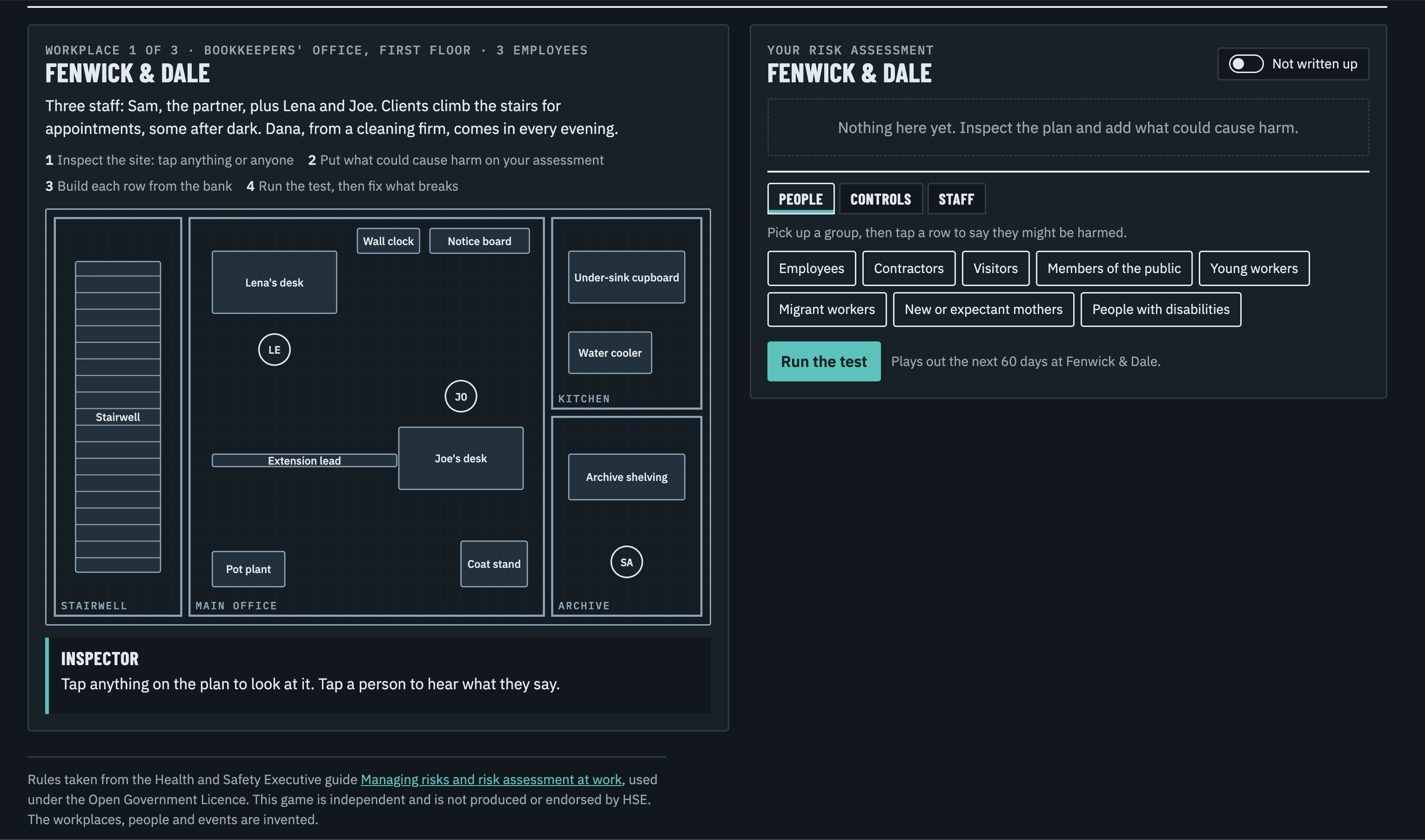
Best source document types: A standard with criteria that work can be checked against, like the Health and Safety Executive’s (HSE) guide to risk assessment.
What to ask AI for: “Build a learning game that follows James Paul Gee’s “co-design” principle: the player is an active maker, not a passive reader, and the game responds to what they build. The aim is for the player to be able to produce [output, e.g. a workplace risk assessment] that meets the standard in the attached document. Model the game on Poly Bridge, a game where the player builds a bridge, tests it under load and sees exactly where it breaks. The player builds the output themselves, from scratch or from a large bank of parts that includes more than they need and some plausible wrong ones. The game then tests their work against realistic scenarios drawn from the standard, and shows exactly where and why it falls short. The player improves it and tests it again. Start with the simplest version: a short, simple task with only a few criteria to meet. Once the player’s work mostly passes, add a harder task with more criteria. Repeat, level by level, until the player is producing the full output. Make it a game, not a quiz. The player acts on the scene, by clicking, setting, typing or building, and never chooses from a list of possible answers. No button, stamp or menu may name or hint at the answer. The game works out whether they were right from what they did, and shows what happens as a result. Check that no simple strategy, such as always saying yes or doing everything, can pass a level. Take every rule from the attached [source document] and invent only the people and scenarios.
How to Check (and Fix) a Learning Game
AI is very good at building games that look finished. Across my experiments, the same two core failure modes kept coming up, and neither of them shows on the surface. Here’s what to look for and how to fix each one.
First, ask AI for the evidence. Most problems in an AI-built game don’t show on screen. You could play a game for an hour and never notice a wrong rule or an answer that’s easy to guess. So, rather than checking screen by screen, ask AI to show its working. To do this, make sure you add this line to the end of every prompt:
After building, give me: a table of every case, with the correct answer and the line in the source document that settles it; a list of every assumption you made; a count of each type of decision the player makes; and the results of a self-test.
Each part of the report helps you catch one or more of the problems below:
The case table lets you check every answer against the source in minutes, rather than playing every level.
The assumptions list shows where AI invented rules, and where it made design calls that should be yours.
The decision count shows what learners actually do. If most decisions are “choose an option”, you’ve got a quiz, and if the game asks for something it can’t mark, the count makes that easier to spot.
The self-test shows whether a lazy strategy, such as always saying yes, can win.
Then check for these two recurring failure modes:
1. A quiz in a game costume
What it looks like: the scenes are realistic, but every decision is a set of buttons. My first data breach game had convincing emails, chat messages and system logs, yet every job came down to three multiple-choice questions.
How to check: ask: “List every decision the learner makes in this game. For each one, tell me whether they choose from options shown on screen, or act for themselves by typing, clicking a spot in the scene or building something. Where there are options, tell me whether the right answer can be guessed, for example because it’s the longest or the others are obviously wrong.”
How to fix it: add the “game, not a quiz” paragraph to your prompt. When I rebuilt the same game with it, learners had to find the problem themselves and type their response.
2. AI designs in patterns that undermine learning
What it looks like: a learner can sometimes complete some games by always saying yes, or just doing everything rather than the right thing.
How to check: download the HTML file version of your game, give it to AI and ask it to “Play this game as a lazy learner new to this topic. Try at least ten simple strategies, such as always saying yes, flagging everything, always picking the longest answer and guessing at random. Tell me which levels each strategy passes.”
How to fix it: once AI has found the issues, tell it to fix them. Then run the test again to ensure it’s fixed. The first version of one of my games failed this test by making the correct response always the first response. Claude found this, then fixed it in one interaction.
Getting Your Game onto Your LMS
Each game AI builds is a single web page. To upload it to your LMS, track completion and see what learners did, you need to wrap it as a SCORM package. This often stops designers in their tracks, but AI can help you to do this too.
Once your game passes the checks, give it this prompt:
Wrap this game as a SCORM 1.2 package I can upload to my LMS. Put the game file and imsmanifest.xml at the root of a zip file. Report completion when the player finishes the final level; a score from 0 to 100; and a pass if the score is 80 or more. Record each decision the player makes as an interaction, with what they did, the correct response and whether they were right. Save progress so learners can leave and come back, keeping the saved data under SCORM 1.2’s 4,096-character limit. If the game isn’t running inside an LMS, it should still play normally. Then give me the zip file and a list of exactly what it reports.
Before you upload the SCORM to your own LMS, test the zip in SCORM Cloud, which has a free account. It shows you exactly what your game sends: completion, score and - importantly - every decision.
That decision-level data is where things get interesting. A completion rate tells you who finished. Decision data tells you what they found hard: which deadline rule catches people out, which breaches go unnoticed, which expenses rule everyone gets wrong. That’s evidence you can use to improve the experience and to find the capability gaps in your organisation.
Conclusion
In 2005, James Paul Gee said the only real barrier to using game design to transform the learning experience was “the cost to implement” it. Twenty years later, AI has removed most of that cost. What it hasn’t removed is the need to know what good design looks like.
That matters, because the question I hear most from L&D teams is no longer how to make more content, faster. It’s “How do I use AI to make the learning experience more dynamic, active and experiential?” The answer, it turns out, is less about the technology and more about the pedagogy. To innovate the learning experience with AI, we need more learning design expertise, not more tech skills.
This is the broader lesson here, and it goes well beyond game design. When you ask AI for “an innovative learning game”, you get a multiple-choice quiz in a fancy costume. When you tell it how to design that game — which principle to follow, what the learner must actually do, and what must and mustn’t appear on screen — the result is a learning game that’s genuinely innovative and has real potential to transform the learner’s experience.
The AI model is the same in both cases. What makes the difference is the level of pedagogical and learning design expertise of the person briefing it.
As AI does more of the building work in L&D, deep design expertise increasingly becomes the scarce value that humans bring. Telling AI what you want is easy: anyone can ask for something better, more dynamic or more innovative. Telling AI how to do the work is a different matter, and it’s where our expertise as learning designers is becoming more valuable, not less.
Happy innovating!
Phil 👋
PS: If you want to work with me to learn how to transform how you design, deliver & analyse learning with AI, apply for a place on my bootcamp.